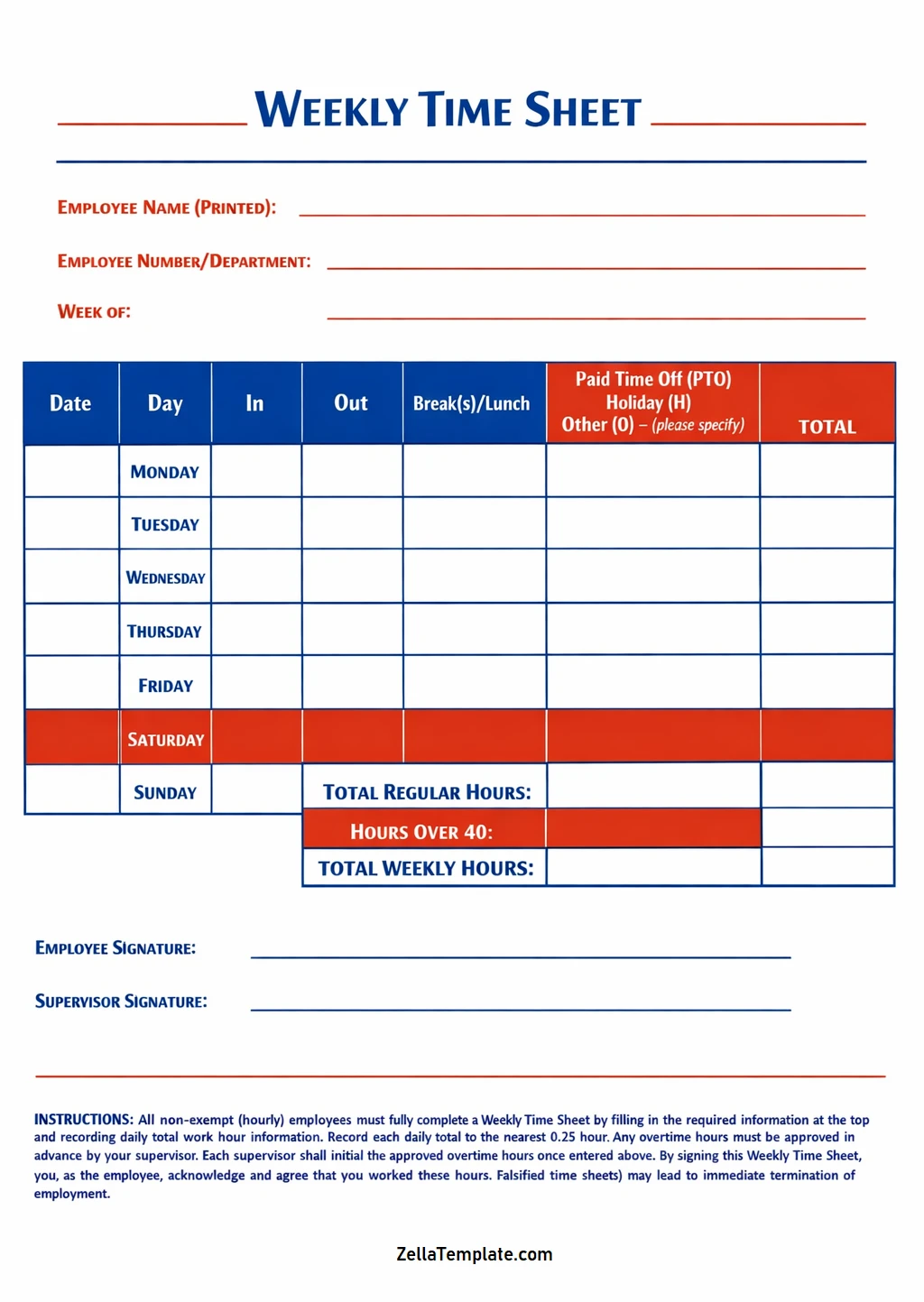
Keeping track of employee work hours, breaks, and project time over one week is crucial for businesses of all sizes.
Table of Contents
A weekly timesheet serves multiple purposes, including ensuring accurate payroll processing, calculating overtime, billing clients accurately, tracking project progress, and maintaining compliance with labor laws. By implementing a weekly timesheet system, businesses can improve productivity and resource management significantly.
What is a Weekly Timesheet?
A weekly timesheet is a tool used by businesses to record the working hours of employees over one week. It allows employees to log their daily work hours, breaks, and time spent on different projects.
This information is then used for various purposes such as payroll processing, overtime calculation, client billing, project tracking, and compliance with labor laws.
Why Use a Weekly Timesheet?
Using a weekly timesheet offers several benefits for both employees and employers.
Employee Benefits
For employees, the use of weekly timesheets has several advantages:
- Transparency: Employees can track and verify their own work hours.
- Accurate Pay: Ensures employees are paid for all hours worked.
- Recognition: Helps in recognizing employee efforts and productivity.
- Time Management: Encourages employees to manage their time effectively.
- Compliance: Ensures that employees are following labor laws regarding breaks and overtime.
Employer Benefits
Employers also benefit from implementing weekly timesheets in the following ways:
- Payroll Accuracy: Helps in the accurate calculation of wages and overtime.
- Resource Allocation: Provides insights into how resources are being utilized.
- Project Management: Aids in tracking project progress and deadlines.
- Client Billing: Ensures accurate billing based on actual work hours.
- Compliance: Helps in meeting legal requirements regarding labor laws.
Key Elements of a Weekly Timesheet
A weekly timesheet typically includes the following key elements:
Employee Information
The employee information section of a timesheet includes details such as the employee’s name, ID number, department, and position within the organization. This information helps in identifying the employee and assigning the work hours to the correct individual.
Week Commencing Date
The week commencing date indicates the start date of the week for which the timesheet is being filled out. This date is crucial for payroll processing and ensuring that the correct time period is being recorded on the timesheet.
Date and Day
Each day of the week is listed on the timesheet along with the corresponding date and day of the week. This allows employees to log their work hours accurately for each day and ensures that no working hours are missed or duplicated.
Time In/Out
The time in/out section of the timesheet includes columns for employees to record their clock-in and clock-out times for each workday. This information is used to calculate the total hours worked each day and for the entire week.
Breaks
Employees are required to note the duration of breaks taken during the workday on the timesheet. Breaks are essential for employee well-being and productivity and must be accurately recorded to ensure compliance with labor laws.
Project/Task Name
In the project/task name section, employees specify the details of the projects or tasks they worked on during the week. This information helps in tracking project progress, allocating resources effectively, and billing clients accurately based on the work completed.
Total Hours
The total hours section of the timesheet displays the sum of hours worked each day and for the entire week. This total is used for calculating wages, overtime, and tracking employee productivity over time.
How to Fill Out a Weekly Timesheet
Filling out a weekly timesheet accurately is essential for effective time tracking and payroll processing. Here are the steps to follow:
Record Daily Work Hours
Employees should enter the start and end times for each workday on the timesheet, including any breaks taken during the day. It’s important to be precise and consistent in recording work hours to ensure accurate time tracking.
Specify Project or Task Details
Assign the time worked to specific projects or tasks on the timesheet to track productivity and project progress effectively. Providing detailed information about the work done helps in resource allocation and project management.
Calculate Total Hours
Add up the hours worked each day on the timesheet to calculate the total weekly hours accurately. This total is used for payroll processing, overtime calculation, and monitoring employee productivity over time.
Review and Submit
Before submitting the timesheet, employees should double-check for accuracy and completeness. Any errors or missing information should be corrected promptly to ensure that the timesheet reflects actual work hours and tasks completed.
Make Corrections if Needed
If discrepancies or errors are identified on the timesheet, employees should make corrections promptly. It’s essential to maintain accurate records to ensure that payroll processing and project tracking are done correctly.
Seek Approval
Before finalizing the timesheet for processing, employees should seek approval from their supervisor or manager. Obtaining approval ensures that the hours worked and tasks completed are verified by the relevant authority within the organization.
Tips for Successful Time Tracking with Weekly Timesheets
Here are some tips for successful time tracking using weekly timesheets:
Be Consistent
Consistency is key when filling out weekly timesheets. Employees should make it a habit to record their work hours daily to ensure accurate and up-to-date information on the timesheet.
Use Categories
Categorizing time worked based on projects or tasks helps in organizing information on the timesheet. Assigning specific categories to work hours makes it easier to track productivity and project progress.
Review Regularly
Regularly reviewing the timesheet helps in spotting any errors or discrepancies. Employees should take the time to check their work hours and tasks completed to ensure accuracy before submitting the timesheet.
Communicate with Supervisors
Open communication with supervisors regarding project time and task allocation is essential. If there are any questions or concerns about the timesheet, employees should seek clarification from their supervisors to ensure accuracy.
Weekly Timesheet Template – DOWNLOAD